
1. How to know how much free space is left?
2. How to know when the last download was made?
3. How to know which file is most often downloaded?
2. How to know when the last download was made?
3. How to know which file is most often downloaded?
How to know how much free space is left?
- Go to “My account” section of your account.

- Choose “Statistics”.
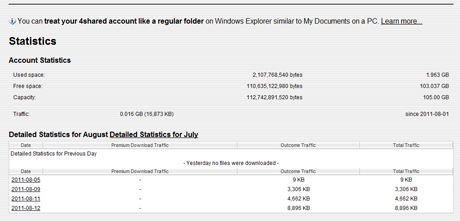
- Define the free space at your account (second line).
How to know when the last download was made?
- Go to “My account” section of your account.
- Choose “Statistics”.
- Click on the “Detailed statistics”.
- Define last downloads.
How to know which file is most often downloaded?
- You can view the detailed web statistics of each file (how many views and downloads) right under the file, when you open it. Or...
- Go to the “Settings” of your account.
- Go to “Public profile” section.
- Put tick near “Show my most popular files”.
- Click on “Go to my personal page”.
- Files, which are the first in rating,are the most often downloaded and viewed.
Testimonials:

Larry, 30
“ I use 4shared account to promote my music or simply to share interesting staff. Often check web and file sharing statistics of my account to know what my friends and fans like.”
“ I use 4shared account to promote my music or simply to share interesting staff. Often check web and file sharing statistics of my account to know what my friends and fans like.”

Thomas, 25
“ When I upload too much I often watch statistics to know how much is left. 4shared provides me with plenty of free gigs but with their accountant too. Great thing!”
“ When I upload too much I often watch statistics to know how much is left. 4shared provides me with plenty of free gigs but with their accountant too. Great thing!”