
1. How to upload or change your account’s background image?
2. How to create a customized account?
2. How to create a customized account?
How to upload or change your account’s background image?
- Go to “Settings” of your account;

- Choose “Background” section;
- Choose “Upload your own background”;
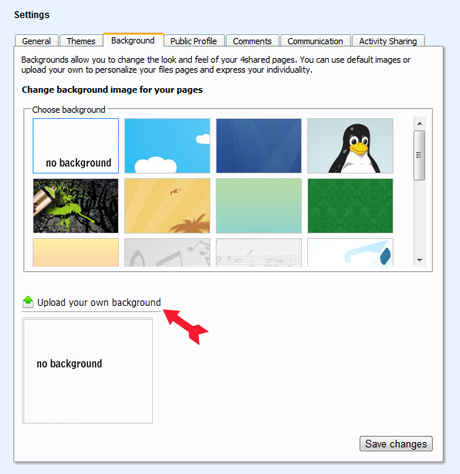
- Upload it.
How to create a customized account?
- Choose or upload your own background;
- Choose your “Download Theme”;
- Choose your “Account Theme”;
- Upload your “Profile image”;
- Write message to your fans;
- Upload unique content to your account;
- Share or link your account with social networks or write to pr4@4shared.com and 4shared team will write about you at 4shared blog.
Kesaksian :

Maryline, 22
“ I really love 4shared’s customized backgrounds. I often change my background photos to reflect my mood or simply to cheer up!”
“ I really love 4shared’s customized backgrounds. I often change my background photos to reflect my mood or simply to cheer up!”

Cathy, 34
“ I’m an artist and often upload as a backgrounds to my 4shared accounts my pictures which makes my account really unique.”
“ I’m an artist and often upload as a backgrounds to my 4shared accounts my pictures which makes my account really unique.”